Revit MEP

Revit MEP
Showing posts with label New. Show all posts

Monday, November 21, 2011

Using Revit as a Team. Use Same Builds.

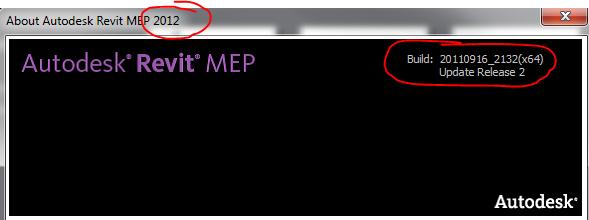
When using Revit on a project, make sure everyone on the team is using not only the same version, (2011, 2012, etc), but the same build number as well.  The build number can be found by clicking on the question mark pull down in the upper right corner, and click the About button….

From there, you’ll see the splash screen of the version, and the build.  The first 4 numbers in the year the build was released, (2010) The next 2 are the month of the release, (09-September), the next 2 are the day of the release, (03-third).  The last four are the actual build number 2115, and the service pack number is new to the newer versions.  Might not be shown for earlier versions.


I’ve seen fatal errors in Revit when teams are using the same version, but different build numbers, and users are syncing their builds local file to the central file, and the central file is receiving updates from multiple builds, when there have been some changes to the software code, and there is a discrepancy  between two items, one new version, one old version, and Revit doesn’t know what to do. 

In order to make sure everyone is using the same build, everyone should be using the latest build.  For 2011, its build 20100903_2115 Web Update 2 Service Pack.  For 2012, it’s build 20110916_2132 Update Release 2.

Monday, October 03, 2011

Project Spark - A future Revit LT?


Project Spark is a technology preview of a new future Revit Architecture (BIM) solution. Using Project Spark, building professionals can create designs efficiently with real-world building objects, produce more reliable documentation faster, and share files with consultants using Revit or AutoCAD-based products.

Project Spark looks like a striped down version of Revit and does not support conceptual design, analysis, rendering, advanced collaboration, and API.  It may turn out to be a Revit LT version of sorts.  I would guess they would come out with all flavors of Revit, but they are only testing the architectural version.  MEP and Structural hopefully would be available when released.
Currently, you cannot open Revit Architecture or Revit MEP 2012 in Project Spark. Files created in Revit are not supported in Project Spark. However, Revit 2012 files can be linked into Project Spark.
You also cannot open Project Spark files in Revit Architecture or in Revit MEP 2012.  Because Project Spark uses a newer Revit file format, it is not currently possible to open files created in Project Spark with Revit 2012.

They're looking for feedback on the overall concept, usability, and learnability of the product.

You can download the preview here.


You can view the tutorial here

Tuesday, March 22, 2011

Revit MEP 2012 New Features

I've been kicking the tires on the beta release of Revit MEP 2012 for the past few months, and I am really looking forward to using the new version.  In last years 2011 version, most improvements came from the enhancements to the electrical portion of the software.  This year, plumbing was the big winner.  Trying to create plumbing systems that worked in real world designs took a lot of effort to make work.  Especially sloped pipe.  A lot of firms used workarounds and created Revit plumbing layouts based off of pipe types or worksets or other means other than by system as Autodesk had intended.  It now looks as though firms should rethink these workarounds, and actually create pipe systems based off of real pipe types the way Autodesk intended it to be used.  Of course, there are other enhancements to existing tools, and totally new tools and features that were added as well. 

Even though there are numerous improvements to the software that will make our Revit MEP world a lot easier, we can't open the box, install the software, and just jump into the new version on our next project.  One of the disadvantages of a user of MEP, is that we have to follow the architects lead.  While there are enhancements in Revit Architecture, the architectural new features aren't as much of a game changer as the new features in Revit MEP.  The Revit Architecture software is on it's 25th release in 11 years while Revit MEP is on its 7th release in 5 years.  So it isn't as mature as it's architectural big brother.  So architects might not see the need to upgrade until maybe June... September... or even next year on their projects.  And because project teams should always work in similar Revit build numbers, MEP users might not have the chance to become more productive with the new features until an architect decides to either A) Upgrade an existing project, or B) Start a new project in the new 2012 version.

But when teams do decide to work in 2012, this is just a few of the things you have to look forward to.
  • Tagging Elements in Linked Files.   I'm not sure on this first feature.  I'm sure I'll find a way this feature will help me in the future, but right now, it just confused me as to where my room/space tags were derived from.  Were they created from the copy rooms feature, or are they tagged from the linked file?
  • MEP Fixture Copy/Monitor improvements.  This was one of my favorite 2011 new features, and it just got better.  When an architect takes the time, and places generic plumbing fixtures and generic light fixtures in their model, why spend our time repeating their work?  With the copy/monitor tool, we can swap out all of the architects fixtures with MEP fixtures that match our specifications.  And now there are more fixture types that we can do this swapping with.  There was a stadium type project I was working on, where there were hundreds and hundreds of water closets in the project.  It would have taken me hours to place our spec WC over the architects generic WC for all the locations.  But using the Copy/Monitor tool, I had all of our Kohler WC families replace the architects "out-of-the-box" Revit WC.  And when the architect decided to move those fixtures 12 inches to the left, I received a notification that they moved because my fixtures were monitoring their fixtures.  Love this tool.
  • Revit Server. Will now support running either Revit 2011 and/or Revit 2012 projects.  Also supports the new worksharing enhancements in 2012.  (See worksharing enhancements below).  Using Revit Server in an office environment that has multiple offices connected over the LAN, this tool is essential to becoming more efficient.  Trying to create a local Revit file over the LAN will take forever, and while the file is opening, it will tie down the central file making it impossible for current uses to modify elements that haven't been checked out or save to central.  In the past, I was asked to make a construction bulletin that would take me about 5 minutes, but opening my local file took over an hour over the LAN.  Thank goodness for multi-tasking.
  • Worksharing Enhancements.  It surprising to me how long this feature has been in the software, and never worked right.  It seems like it was a placeholder for something bigger and better to come.  Well, that time might be now.  When you wanted to modify a fixture or system, and it was being used by another user, Revit had a dialog box that made it seem like you could make a request through Revit, and ask that user to relinquish it.  But that user need to open the "Editing Requests" dialog box to see these requests.  And that never happened at a time when you needed it to happen, like right now.  So you ended up just calling them on the phone.  Then there was the Worksharing Monitor Add-In.  This at least had a dialog box that could stay open while you were working that you could throw up on a second monitor or something so that you could see these requests as they happened.  But A)It was a separate install that seemed to never get installed. and B) It was a separate program that needed to be opened and running after you opened Revit.    Well, now that we have a little background, here is a couple of the new features.  First is that you could never disable worksharing.  Once you enabled worksharing on a project, that project was going to be workshared forever.  Second, you can set the visibilty of worksets in a view template now.  Third, there are new color display modes allowing users to visualize owners of objects by color, or ownership status of elements by color, or elements that are out of date by color, or which elements are assigned to particular worksets by color.  It can be toggled on and off.  Fourth, Revit now provides balloon notifications when editing requests are placed, granted, and denied.  So now you don't have to check the Editing Requests box to see if someone is waiting on you, or install the Worksharing monitor and open a separate dialog box to check these requests. 
  • Starting View.  This was a known issue, that Revit opened slow if the last view that was open when the project was saved, was a complex view.  So users had to remember to create a simple view, usually with just text of the project name and number, and to have that as the last view open when saving and closing the project down.  But now there is a setting under the Manage Tab, where you can specify which view you want to be the Starting View so users don't have to remember which view they should go to when saving the project.
  • Workset changeable without editablity. In the properties palette, the workset parameter can now be edited without first borrowing the element.  Before, that parameter was greyed out until you had ownership of that element.
  • Enhancements to DWG Export tool. The export setting are displayed on a series of tabs making it easier to map layers, lines, patterns, text and fonts to AutoCAD styles.
  • Locking 3D Views and Tagging 3D views.  This is a biggy.  In the past, you could only put dumb text in a 3D view.  Never a smart tag.  And if you rotated that view, the text would skew because it was on another plane.  Now, as long as you lock a 3D view down, (which is new) you can tag a Revit element.  You won't be able to lock the default 3D view, but create a copy, and that one will be lockable.  Just beware, you can't tag a room/space in a 3D view.
  • Schedule and Legend Creation from Project Browser.  This is nice.  Before, you had to open up the Views Tab on the ribbon to create a view of these types.  Now just right click on Schedule or Legend in the project browser, and create new.
  • Save all Families.  Users can save all families that are loaded into a project to a directory.  This is nice for helping create future project templates.  You might finish a hospital project using a lot of hospital families, and you want to now create a Revit hospital project template.  You can now save those families in a batch type of method from the previous hospital project and load them into your new template.
  • Round Function in Formulas.  Values in formulas can be now rounded up or down. Round(x), Roundup(x), rounddown(x).
  • Materials.  There is significant changes to using materials in elements in Revit 2012.  While there is a significant amount of work "under the hood" that is not user visible, the items that are available to users this version focus around efficiency in managing materials within Revit, and introducing a library concept that will be extended in the future.
  • WikiHelp.  Revit online help is now provided as WikiHelp. In addition to viewing the Autodesk-provided help content, users can rate and comment on content, and they can add their own articles, images, and videos. If you are online and you access context-sensitive help (click a Help button or press F1), by default you go to the WikiHelp. If you are offline and access context-sensitive help, by default you will go to a locally stored copy of the help system.
  • Sloped Piping.  A user can now create the pipe slope values in the Mechanical Settings. The slope values can be transferred from project to project.  This new method, along with additional new sloped fittings seems to allow the creation of sloped piping systems much easier and consistent.  There still needs to be best practices and methods that should be followed when creating sloped pipe.  You won't be able to just draw sloped pipe in any direction from any starting point.  There needs to be a thought out strategy to where you are going to start your main sloped pipe system, and where it's going to end, and how it's going to be integrated by the fixtures.  It was hard, but I've had success creating sloped piping in previous versions, but this version is much less work and headache to create a sloped system.  I'm not saying it's going to be easy, but with a well laid out plan, you can be very successful creating sloped pipe is a rather short period of time.
  • System Browser.   This was always an overlooked feature in the past because so many engineers just wanted construction documents and not an engineered system.  So systems were rarely created in MEP projects.  But this tool should be used more for multiple reasons, but one is just based off of better performance of the model.  Unconnected systems dramatically decrease the speed of the project.  You can view all of the connected and disconnected systems from the System Browser.  Selecting elements in the system browser also selects the element in the project.  And if you press Shift or CTRL, you can select multiple connectors.  Also, in the old version, if you selected elements in your model, they were not selected in the system browser.  Now they will be selected in both areas when you pick them.
  • Graphical Overrides for Duct and Piping Systems.  You can now create and name duct and piping system types from a predefined set of "basic" system types. A duct or piping system type contains properties for graphical overrides. You have the ability to control the color, line weight, and line pattern for the collection of objects assigned to a system using these. The graphic overrides applies to the project, they are not view specific like Filters are.   Similar to other system families, the duct and piping system types are now available in the Project Browser similar to how pipe types are in the Project Browser. The duct and piping system types are sorted under Families in the family category folder "Duct Systems" and "Piping Systems".   Use the "Other" system type when creating a custom system of a type that is not native to Revit MEP.  For example, if you wanted to create an Oxygen System, duplicate the Other system type and rename it to Oxygen. You can get to the system type properties for a particular duct or pipe by pre-selecting the element and pressing Tab until the system is highlighted. With the system selected, in the Property palette, click Edit Type to access the type properties of the system.  In the Type Properties dialog for duct and piping systems, click Graphic Overrides to display a dialog where you can override the Line Weight, Color, and Line Pattern.  The "system" overrides for the graphic attributes are prioritized between Phasing and Filters. This means the color, line pattern, material, etc. per system type, will override the settings per category. However, a view filter takes precedence over the system type settings.
  • Rendering Material for Duct and Pipe systems.  This was something users always asked me, and I always told them that you couldn't change the material for system families.  But it looks like the game has changed when it comes to materials.  You can apply a specific rendering material that is different from the physical material.
  • Ability to Specify a System When Placing a Duct or Pipe.  Another game changer.  You know have the ability to specify a "system" on a duct or pipe without attaching it to a fixture or equipment.  When inserting a duct or pipe, a new System Type parameter is available in the properties palette.
  • Create Duct and Pipe Systems from a Selection of Fixtures.  When you create a system from a fixture or equipment, it is now possible to select a system type and a system name for the system and start in the system editor right away.  In the past, you had to first create the system, then go to the system editor to edit the system.  It took multiple steps, when now it's all in one step and much faster to do with less mouse clicks to do the same thing.
  • Graphical Warnings for Analyzing and Validating Duct and Pipe Systems.  This is a feature that AutoCAD MEP has had for years.  It's a toggle on/off that can show system disconnects with a warning marker.
  • Turning off System Calculations.    When I first read this, I thought to myself, "That's not new."  But now you can turn off a particular system, rather than turning off all calculations.  There is a new parameter on the system type properties to limit or turn off system calculations.
  • System Connector Labels.  This is nice.  In the past, you had to hover over a connector and wait to see what type of connector you were dealing with.  Now you can identify the properties of a connector from the leader and a label showing the system type, size, flow, direction, and fixture units. 
  • Modify Systems while Adding Duct or Pipe.    This will save a lot of time too.  You can modify the system of fixtures or equipment while laying out duct or pipe instead of ending your command, and opening the system editor, and editing the system of that equipment.  So for example, if you connect an unassigned return grille to a return duct system, it will automatically place that grille on the return duct system, rather than having to edit the return system, and add the grille manually.
  • Ability to Create Interconnected Systems.   You can now connect systems that use different system types.  For example, vent and sanitary systems may now be connected.  In the past, as soon as you connected a vent sub-system to a sanitary system, the vent system changed to sanitary and your override filters that showed the linetypes of the two different systems all changed to one linetype in your drawings, thus not showing any venting on your project.  Very bad.  So workarounds were developed to evercome this.  But you no longer need to use those workarounds now that we can interconnect systems, and they stay separated.
  • Create Duct or Pipe Placeholder Elements.   Placeholder objects are ducts and pipes that can be used early in the design stage to indicate the approximate location of a duct or pipe run, or to show a layout that hasn’t been fully sized and you do not want to show the ducts or pipes as double line geometry. You are able to create a duct or pipe placeholder layout path. The placeholder layout path is a simplified duct or pipe without fittings. These objects allow for easy creation, modification, and future conversion to the more detailed ducts or pipe layouts currently available. The workflow is that you create placeholder layout path, modify the layout path, and then converts to the real two-line duct or pipe layout. In the past, the automatic layout path that Revit created was useless.  And editing the path was more work than just manually drawing pipe or duct.  I can't imagine that the automatic layout path tool got any better, but I can imagine that modifying the layout path that was generated has improved.  The jury will be out on the benefit of this feature, as it gets used in real world applications.
  • Parallel Conduits and Parallel Pipe Runs.  You can now create new conduit runs or pipe runs parallel with the existing conduit or pipe run.  The key to this feature is that you draw one baseline run, and then run the parallel runs afterwards to match the first run.  There will be two options for the fittings.  Either the same bend radius or concentric bend radius.
  • Insulation and Lining.  In the past, the best way to add insulation and lining was to create a pipe/duct schedule, and create columns to show different systems, and add insulation and lining through a schedule.  That still might be the best way, but now you cn add insulation to an entire duct or pipe run with a single command.  Before, you could only do it to one piece. 
  • Interference Check for duct/pipe Insulation.  A new option in the Run Interference Check is Duct insulation and pipe insulation.  In the past, you could only run interference checks on the pipe or duct objects themselves.  And if you wanted to check if the insulation would interfere, you had to draw pipe/duct by not the actual size, but by the size that included the insulation without insulation.
  • Panel Schedules.  You can now choose to display panel schedule totals in either current or load values.  Previously it was only load values.  You can also change the way that multi-poled circuits are displayed in the panel schedule.  There is a new toggle to wither merge 2 or 3 pole circuits into a single thicker cell, or leave them as 2 or 3 separate cells.  There a new feature to show the number of slots from the equiment instead of a setting.  You can also now control various capitalization options for a circuit's load name.  And finally, you now have the ability to display connected load classifications in the panel schedule.  For any load classification used by a load connected to the circuit, the connected load classification can show in the properties palette for an electrical circuit.
While there are a ton of new enhancements to make Revit MEP 2012 better than before, they haven't solved every wishlist item we've been asking for.  Some tools take years to develop and to work correctly in a final release.  Autodesk won't release a new feature if it hasn't been tested internally or by the beta users and works flawlessly.  Sometimes new features are introduced in segments, where you'll only see a portion of what the final feature will look like in years to come.  The developers can't create the world in 6 days like someone I know, but it's a process. 

I hope you learned something new by this post, and I look forward to this new release.

Friday, October 01, 2010

The New “Revit Server”

Link to AECbytes "Revit’s New Server Extension" Article (September 28, 2010) by Lachmi Khemlani.  Lachmi Khemlani is founder and editor of AECbytes. She has a Ph.D. in Architecture from UC Berkeley, specializing in intelligent building modeling, and consults and writes on AEC technology. She can be reached at lachmi@aecbytes.com.

The Autodesk® Revit® Server Extension helps geographically dispersed teams more easily collaborate on projects of varying size and complexity. Web-based services help keep teams coordinated as they work on a single project from separate locations.

The Autodesk Revit Server Extension helps you to:
  • Work more effectively as a single project team over a distributed wide area network (WAN) with higher performance and efficiency
  • Maintain a seamlessly integrated collection of Revit central models on a single server that team members can access from local servers
  • Easily manage products on Revit central server using the web-based Revit Server Administrator tools
  • Benefit from built-in redundancy in case of WAN connectivity loss
This Subscription Advantage Pack consists of two separate components: an application update, Revit 2011 SAP, and a server component, called Revit Server 2011. An installation of Revit Server may function as a local server or a central server. However this document does not draw any distinction between the two, as the installation and removal requirements are essentially the same for both.

Revit Server 2011
Systems hosting Revit Server 2011 must have:
    • Microsoft Windows Server® 2008, 64 bit (not 2008 R2)
    • Microsoft IIS 7.0
    • Microsoft .NET 3.5 SP1
Refer to the Revit Sever Installation Guide supplemental documentation for more detail on system prerequisites.

Revit’s New Server Extension 2011 Video


Wednesday, September 29, 2010

Revit MEP 2011 Update 2 – September 2010

Revit MEP Update 2 – September 2010

Important Note:
Update 2 is not a full install; rather it is using service pack technology similar to AutoCAD®- based products. Prior to installing the Update 2, please verify that you have already installed the First Customer Ship build of Autodesk Revit MEP 2011 which is available below.


Update Enhancement List
Improvements made in Update 2 build (20100903_2115):


Autodesk® Revit® MEP 2011 Enhancements
  • The list of supported video cards and drivers has been updated.
  • Improves stability when opening a recovery file.
  • Improves the selection of the proper fire damper size when inserted into an oval duct.
  • Remembers the last justification when adding duct from the draw duct option within the right click menu.
  • Corrects the creation of a small duct segment when a reducer is inserted due to a change in duct size.
  • Improves stability when dragging a duct end to the connection point of hosted equipment.
  • Improves the automatic joining of Cabletrays.
  • Corrects the value produced for a calculated value column within Panel Schedules and Demand Factors.
  • Allows the load value of a spare within a panel schedule to be editable.
  • Corrects the display of Wire Size and Type properties to be “—“ for spares in panel schedule.
  • Corrects the unit formatting of cells within the Load Summary of a Panel Schedule.
  • Corrects the display of circuit number on wire tag when using circuit naming By Phase.
  • Improves snapping an adapter to sprinklers when inserted from the project browser.
  • Corrects the Air Changes per Hour calculation when running a heating cooling load analysis.
  • Improves the connections produced by Routing Solution layouts of pipe or duct.
  • Improves consistency of adding pipe, duct, conduit and cabletray when snapping to non-MEP elements.
Autodesk® Revit® Platform 2011 Enhancements

  • Improves stability when locking of constraints within families.
  • Improves stability when modifying the properties of an element.
  • Ensures „Select All Instances‟ when used on viewports within a sheet does select all the viewports.
  • Improves stability when using the “Create Form” tool when In-Place edit a mass.
  • Improves stability when using “Complex” complexity mode during gbXML Export.
  • Corrects glazing area when using “Simple” complexity mode during gbXML Export.
  • Improves stability when editing element Phase inside a group.
  • Improves consistency of the ifcflowsegment and ifcflowfitting properties during a re-export to IFC.
  • Improves stability when exporting to AutoCad 2000 DWG files.
  • Improves stability during export to DWG files when exporting a view with a linked DWG in "new layers for overrides" mode.
  • Improves stability after switching location within the InfoCenter settings
  • Improves stability of InfoCenter when logged into Revit with a double byte username.
  • Improves stability when selecting materials from within the materials dialog.
  • Improves stability when switching between views
  • Improves visibility of manually applied hidden lines during printing and exporting of Structural Hidden Lines views
  • Improves performance when using spinner control in the Decal Types dialog.
  • Improves stability when selecting array elements from within the Reveal Hidden Elements display mode.
  • Improves stability when finishing Sketch mode.
  • Improves stability when selecting a reference plane within the conceptual mass editor.
  • Improves stability when launching multiple sessions of Revit.
  • Corrects shadow casting of linked RVT files when in realistic display mode.
  • Improves stability when dragging sun.
  • Improves stability when upgrading Revit 2010 project file.
  • Corrects color of masked regions when rendered in Consistent Color display mode.
Autodesk® Revit® 2011 API Enhancements

  • Setting formula for Manufacturer/Type Comments as string no longer throws an exception.
  • Improves consistency between User Interface and API when using Family Type count
  • Improves the consistency of maintaining the preview image when Save/SaveAs.
  • Improves the consistency of creating the detail curve when the view’s detail sketch plane is not located where expected within the database.
  • Improves detail curve creation when the view does not have an implicit sketch plane.
  • MEP API: Cabletray Connector Angle property no longer throws an exception when rotating a cabletray.
  • MEP API: The following Electrical Parameter Types have been exposed to DB.ParameterType:
    • CABLETRAY_SIZE
    • LOADCLASSIFICATION
    • ELECTRICAL_TEMPERATURE
    • ELECTRICAL_DEMAND_FACTOR
    • CONDUIT_SIZE

Wednesday, June 23, 2010

Autodesk® Revit® MEP 2011 Update 1


Download is the latest update for Autodesk® Revit® MEP 2011 software as part of AutoCAD® Revit® MEP Suite 2011 software.  There are separate downloads for the 64 bit and 32 bit versions.

Update 1 is not a full install; rather it is using service pack technology similar to AutoCAD®- based products. Prior to installing the Update 1, please verify that you have already installed the First Customer Ship build of Autodesk Revit MEP 2011.  This is how Autodesk has been pushing updates out lately, which is different than in years past where you had to download and install a whole new build of the program. 

The service pack can be applied to both the standalone and suite versions of Autodesk Revit MEP 2011.  This is also different than in years past.  Autodesk used to have different downloads for the Revit MEP build and the Revit MEP Suite build.

For a list of improvements, please download the Autodesk® Revit® MEP 2011 Update Enhancement List: or see them below.


Update Enhancement List


Improvements made in Update 1 build (20100614_2115):

Autodesk® Revit® MEP 2011 Enhancements

  • Improves stability of the Location dialog.
  • Improves performance of panel schedule views.
  • Allows Calculated Values to be added to Load Summary section in panel schedule templates.
  • Improves display of panel schedule borders.
  • Improves the stability of distribution systems that use a L-G Voltage value of None.
  • Enables Slope and Justification editors for layouts that include duct and pipe accessories.
  • Enables Copy/Move/Array tools for layouts with sloped and non-sloped pipes.
  • Improves sizing when a round takeoff is connected to a rectangular duct.
  • Improves stability when changing the location setting for heating and cooling load calculation in worksharing.
  • Improves stability when connecting conduit to equipment surface.
  • Improves surface connection between different design options.
  • Improves cable tray bend radius control.
  • Improves temp dimension witness line snapping in surface connection edit mode.
  • Improves converting cable tray tee to cross.
  • Improves stability when drawing a cable tray from equipment.
  • Improves stability when editing type properties of electrical equipment.
  • Disables the Modeless Properties Dialog when a value is changed in the Type Selector to avoid confusion or an incorrect property change.
  • Updates the pressure drop calculations through a transition using the coefficient loss method when reporting the static pressure on systems.
  • Improves Move functionality to allow the user to select different views without having to reselect elements.
  • Improves Move and Copy functionality to allow the user to move/copy at any angle when an elbow fitting is included in the selected elements.
  • Improves Move and Copy functionality during movement in 3D views.
  • Improves Move and Copy functionality to maintain depth when used in elevation or section views.
  • Improves Rotation functionality to allow the rotation of sprinklers in elevation views.
  • Disables disconnect warnings when drawing round duct from a rectangular duct using the tap fitting “Tap-Perpendicular”.
  • Ensures the direction of the connector on Air Terminals is verified for the proper orientation of the Air Terminal.
Autodesk® Revit® Platform 2011 Enhancements
  • The list of supported video cards and drivers has been updated.
  • Improves stability in working with families.
  • Improves stability when deleting views.
  • Improves stability when export to gbXML.
  • Improves stability when view "Analytical Surfaces" in the Export gbXML dialog.
  • Correct export of embedded curtain walls to gbXML.
  • Improves stability when export to DWG.
  • Improves stability when export a split view with shared coordinates to DWG.
  • Respects crop region with blocks when exported to DWG in wireframe visual style.
  • Correct placement of annotation when exported to DWG.
  • Improves stability when Export to DWF.
  • Improves stability and performance when working in the Materials dialog.
  • Improves IFC import to display a warning when encountering a geometry issue that would have previously caused instability in some cases.
  • Improves Properties Palette and canvas interaction that caused unstable graphics if family regenerations were interrupted.
  • Updates to placed instances will now occur when reloading a Family Parameter into project environment as a Reporting Parameter.
  • Improves In Canvas Parameter Labeling to allow a Reporting Parameter to be created when an Instance or Type Parameter could not be.
  • Disables Reporting Parameters between In Place Families and Reference geometry.
  • Correct parameter names display within the Decal Dialog.
  • Improves consistency between Revit and Max when exporting lights with IES files via FBX.
  • Restored custom quality setting that controls number of refractions in a rendering.
  • Improves the performance when adjusting the exposure of a rendered image.
  • Improves issues encountered when rendering elements with different phase settings.
  • Repairs upgrade issue with certain light fixtures using IES files.
  • Repairs printing issue where Scope Boxes from Linked files were visible despite Print settings turning them off.
  • Ensures correct orientation of Elevation tags when tag family is edited.
  • Improves stability when switching among the tabs in RVT Links Display Settings.
  • Improves stability when ungrouping arrayed elements.
  • Improves Filter Rules.
Autodesk® Revit® 2011 API Enhancements

  • Elements will now be properly joined when the ExternalCommand concludes when using automatic regeneration and automatic transaction
  • ExportImage(ImageExportOptions ) no longer throws an exception when given a set of views
  • ElementParameterFilters now operate properly against ElementType elements
  • Improves stability when saving a family and there are event subscribers for Save or Save As.
  • Closes the Family editor environment after loading a family via the API
  • Improves stability when using selection APIs to pick grid elements.
  • Dynamic Model Update: GetChangeTypeGeometry() now triggers properly when active type is changed
  • Improves stability for Dynamic Model Update: when registering updaters and more than one application is registered

Saturday, May 15, 2010

Troubleshooting Revit MEP

A 20 minute video from Autodesk's Harlan Brumm and Jerry Lee Smith covering:

Overview of the Revit MEP Workflow
  • Create new project using MEP template
  • Save Arch model as central file on server
  • Link in models using origin-to-origin
  • setting links to be room bounding
  • copy/monitor levels
  • Setting up views and apply view templates to views
  • create levels to account for plenum spaces
Troubleshooting Spaces and Zones
  • space not visible in view
  • rooms are "unoccupied"

Troubleshooting Revit MEP Performance
  • Not following workflow
  • not creating logical systems
  • large connected duct networks
  • complicated families
  • poorly connected elements
  • Limit color schemes
  • place endcaps on open ducts
  • ensure flow direction on connectors is correct


Revit MEP Comparison Matrix

Compare features from Revit MEP 2009, 2010 and 2011 and see what you're missing!

Revit MEP Comparison Matrix

Monday, April 19, 2010

Upgrading Your Custom Revit MEP Library from 2010 to 2011 Format

Because some architects might be early adopters to 2011, and some architects might wait until the first service pack is released before upgrading their projects to 2011, engineers will find themselves working with architects using different versions of Revit.  Because Revit is not backwards compatible, engineers will have to run multiple versions of Revit MEP to match each architect that they are working with.

The history of this issue is that everybody working on a Revit project must be using the same version of Revit.  Architecture, Structural and MEP must all be the same.  If one team is using an newer version, the other teams who are using an older format won't be able to read the newer format.  The new format has new tools, new objects, and new settings that older versions don't understand, and weren't written to automatically know what new objects would be coming out in the future.  Now if one team is using an older version, the other teams will be able to open an older version, and upgrade that project to the newest version, but the team using the older version won't be able to open the new format version of the other team members.

So now that we understand why we have to install multiple versions of Revit MEP on our workstations, we will also need to have multiple versions of Revit Libraries on our server.  The 2011 directory, obviously will have the newest contect, and that content can only be used for 2011 projects.  That content cannot be used for 2010 projects.  So any 2010 project must use content from a 2010 content directory.  Any custom 2010 content can be copied, and the copies can then be upgraded and added to the 2011 directory.


To Use the Content Batch Upgrade Utility:


  1. Copy Upgrade_RFA.txt and Upgrade_RFA.bat into the root directory of the library that you want to upgrade.
  2. Run the Upgrade_RFA.bat to create the file list to upgrade, famlist_rfa.txt.
  3. To launch the utility, from the library directory, drag Upgrade_RFA.txt onto the Revit icon on your desktop.
  4. After upgrading, delete all backup files from the library.


Make sure all of your .rfa files are not read-only and delete all backup files from the library. If a particular family fails to upgrade properly, the utility will stop.  If this occurs, open famlist_rfa.txt in Microsoft Notepad, and remove all previously upgraded families and the failed family from the list. Save famlist_rfa.txt, and re-run the utility.

Friday, March 26, 2010

What's New for Revit MEP 2011

Well, as Steve Stafford put it, "Let The Noise Begin" is pretty much nailing it on the head.  In the next few days, there is going to be a lot of chatter on the internet about what 2011 will bring to it's users.  And for MEP, I think it will be a lot.  Enough where processes will change and be more efficient.  Over the next couple weeks, I'll be posting videos on demonstrations of some of the new features that Revit MEP 2011 offers and how these features will change the way you work.  But in the meantime, here is a summary of what you should expect when the software is released in a few weeks.

Cable Tray and Conduit
In addition to pipe and duct, we now have cable tray, conduit, cable tray fittings and conduit fittings.  You can expect to place these types of items in just like you place pipe and duct. 


You be able to load various conduit fittings and cabletray fittings....


 ...and create various family conduit types and cabletray types.


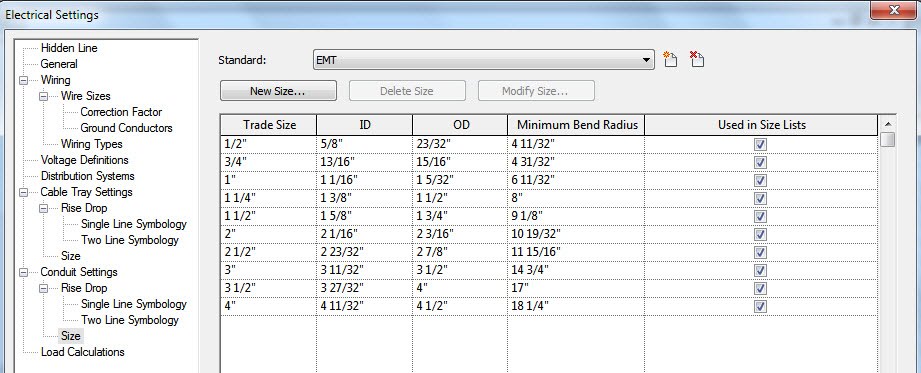
It comes out of the box with various sizes that include inside and outside diameters.  You also have control of customizing various cable tray and conduit sizes as well.


You can control the Detail Level and control the Visibility and Graphics of conduit and cable tray to control the display those objects just as you can currently control the display of piping and duct.

You can check for interferences of cable tray and conduit with other types of objects in your project model.


You can schedule cable tray and conduit using the same procedures that you used to schedule pipe and duct.  When you draw cable tray or conduit without using the no-fittings opition, it is scheduled as a single run.

Electrical Demand Factors
You can use demand factors to adjust the rating of the main electrical service for a project.  This is used since not all electrical equipment will be on all the time.


There are many demand factors that come out of the box, and you can easily create additional demand factors that are needed for the codes in your area.  The demand factor can be determined by a constant value or percentage, or by the quantity of connected objects or by load.

These demand factors are assigned to various load classifications which are then assighed to electrical connectors. 

Tagging on Placement
There is a new Tag on Placement option that automatically adds a tag for a component when it's placed in the model.  Once the tool is selected, you'll have options in the options bar of it's placement.

Companion Flanges
You can add flanges to your pipes and are separate objects than the pipe itself.  So when you make an elbow, there are actually 5 components.  Two pieces of pipe, one elbow, and two companion flanges.  You must make sure that the flanges are loaded into your project and assigned to your pipe type to be inserted automatically.  You can, however add flanges manually as well.

Oval Duct
Finally, Revit now has oval duct to add to it's current round and rectangular duct types.  Make sure to load the oval duct fittings into your project and assigned to your oval duct type.  You have the same parameteres to size oval duct as you did with round and rectagular duct.


Placing Valves and Fittings in Section or Elevation Views
This is another big one.  When you have stacked pipe, and need to put a valve on the bottom pipe, you always had to temperarily hide the upper pipe to place the fitting on the lower pipe.  And putting a valve on a vertical pipe was difficult and very time consuming. 

New Electrical Content
New content has been created for electrical components.  Most of the content is located within the Electrical Compnents folder.  The content folder is slightly different than in 2010 so be careful when creating your new 2011 library folder.
Thursday, October 01, 2009

Revit MEP 2010 Update 2 Just Released

Update 2 is not a full install; rather it is using service pack technology similar to AutoCAD based products.

http://usa.autodesk.com/adsk/servlet/item?siteID=123112&id=12899931

There are two separate downloads…one for 32bit and one for 64bit. Make sure you download the correct version!

This second service pack contains the changes made from the previous service pack (Update 1 - June 2009).

This service pack can be applied to both the standalone and suite versions of Autodesk Revit MEP 2010.

Improvements made in Update 2 build (20090917_1515):

Autodesk Revit MEP 2010 Enhancements


  • Wire length in the Circuit Properties dialog will now display “Not Computed” for the wire length when a panel has not yet been assigned to a circuit.
  • The calculation of complex space volumes for heating and cooling loads has been improved.
  • Panel and circuit information can now be displayed in a mechanical equipment schedule.
  • Improved the ability to swap one type of pipe or duct accessory for another type of pipe or duct accessory.
  • When use of the Split tool on a duct segment creates a union, the union is no longer automatically deleted when a new duct is connected to the union.
  • Improvement of a duct segment centerline alignment when rotated in an elevation view.
  • Windows and doors set as demolished will no longer appear in a gbXml export.
  • Improved stability when copying elements from one family to another in the Family Editor.
  • When the Create Similar tool is used for a sloped pipe, the slope is now properly maintained for the new pipe.

Autodesk Revit Platform 2010 Enhancements

  • Annotation objects no longer disappear when panning a view that spans two monitors.
  • Improves stability when switching between Autodesk Revit Architecture 2010 software and Google Earth™ software.
  • Improves the modification behavior of hosted sweeps (i.e. gutters) attached to joined roofs.
  • Improves stability and performance when modifying walls.
  • Improvements to shared nested families.
  • Improves stability when modifying masses.
  • Improves design option rules adherence for walls in different design options and worksets .
  • Family and type information can now be read in Autodesk® 3ds Max® software from an FBX® file exported from a non-English version of Autodesk Revit Architecture 2010.
  • Improves stability when adding views to sheets.
  • Improves stability when making a design option primary.
  • Improves stability of printing views in wireframe mode.
  • Shadows will no longer be cropped when a view is printed or exported to a DWF™ file.
  • Subscription notifications are now available from InfoCenter.
  • Improves stability when reading IFC files.
  • Improves stability when opening a project with an inserted TIF image and when importing a TIF image.
  • ViewCube® navigation tool and the navigation bar will now display correctly after unlocking the computer.
  • Improves stability when removing panels from the ribbon.
  • Improves stability when cancelling a move, delete or copy command.
  • Improves performance of view renaming and the Workset dialog.
  • Mass floor schedules will now update when a level is renamed.
  • A form element that has a divided surface applied to it will now be correctly generated after a copy, paste, or move.
  • Improves stability when exporting to DWG.
  • Dimension and spot elevation values will now display correctly in a dependent view.

Tuesday, July 07, 2009

REVIT® MEP 2010 Update 1 build (20090612_2115):


Improvements made in Update 1 build (20090612_2115):

Autodesk® Revit® MEP 2010 Enhancements
  • Export to IFC will now respect the level of detail associated with the current view.
  • Improved stability when copying family geometry from one family to another.
  • Added support for wire gaps to display when starting a project without a template.
  • Improved circuiting on electrical devices that contain more than one electrical connector.
  • Circuits will no longer be un-circuited or rebalanced during a save to central.
  • Improved ability to re-host face hosted elements.
  • Space tag leader is now assigned to correct space tag category for view control.
  • Space separation line now works when walls are grouped in linked architectural models.
  • Diameter control in the Options Bar now displays correctly.
  • Fixed problems with demand factors being deleted when using the Undo command after making a change to a demand factor.
  • Fixed memory leak when printing or publishing in 64-bit OS.
  • Corrected the default unit value for air viscosity in mechanical settings.
  • Improved stability when adding a pipe connector in a family with imported CAD geometry.
  • Corrected display of single line rise/drop pipe graphics in a section view.
  • Can now change the pipe accessory type of inserted families that only contain one connector.
  • Plan regions now display geometry correctly.
  • Fixed disconnected fitting when changing the duct elbow type when it is back to back with a reducer.
  • A duct fitting tap will no longer be incorrectly rotated when changing the width of the main duct.
  • Routing solutions will now be provided when selecting both a duct assigned to a system and an undefined duct.
  • Improved stability when trying to draw ducts in a project with no levels.
  • In some instances ducts would incorrectly display as single line when using color fills. This has been corrected.
  • Improved stability when justifying ducts in a section view.
  • Eliminated extra graphics that would occasionally display on duct fittings.
  • Airflow is now added to duct branch when using connect into from a diffuser and connecting to a main duct.
  • Corrected problem of duct branches moving when nudging a main duct using the arrow keys.
  • Corrected problem of justifying ducts breaking connection to taps.
  • In some situations, sloped single line pipes would not display. This has been corrected.
  • MEP objects that are below the bottom of the primary view range will now be displayed using the beyond linetype.
  • Improved stability when selecting equipment in a partially created air system.
  • Justification will now be automatically changed to center/middle when routing duct or pipe in a section view.
  • When using the layout path tools, small offsets will now be displayed in yellow to indicate that the layout will probably fail if the path is accepted. When this occurs, the user should select another path option or modify the path manually.
  • Improved the geometry that is exported as gbXML for energy analysis including eliminating extra cutouts and small sliver spaces.
  • Metric models are now imported correctly as metric units when importing into Autodesk®
  • Green Building Studio® web-based service.
  • Improved stability when editing the zone tag leader family.
  • Improved stability when editing nested families.
  • Building pads are now correctly exported to gbXML as floors instead of walls.
  • Plenum spaces will now display with plenum icon in Heating and Cooling Loads dialog.
  • Improved stability when deleting a phase value from an electrical distribution system.
  • When using the draw duct command from the right click menu, the new duct will automatically match the shape and size of the selected duct.
  • The total load on a power panel will now properly update when an electrical device is changed to a different type with a different load.
  • Added tools for pick edges, line shapes, etc. in space separation tool in ribbon.

Autodesk® Revit® Platform Enhancements

  • Dragging a ribbon panel near a view no longer causes the view to pan.
  • Improvements to color fill output when exporting to DWFx.
  • All reference callouts, sections, and elevations will mirror when project is mirrored.
  • When the sheet view is active, ribbon commands display the correct UI state.
  • "Is Reference" Instance Property is available for reference points.
  • Commands in Print Preview mode can now be accessed by keytips.
  • Improves stability when printing.
  • Decal image path is now saved.
  • Disables the "Add to Quick Access Toolbar" option when tool already exists on Quick Access Toolbar.
  • View Control Bar no longer shows old and new state of commands until the view is redrawn.
  • Improved detail level icons in the View Control Bar.
  • Improvements to form creation and editing of conceptual
  • Improvements to divided surfaces on conceptual masses.
  • Improved graphic performance when using View Cube® navigation tool.
  • Images will now display in print preview and print correctly.
  • Improved stability when printing to PDF.
  • Type Selector preview images update for types created by Duplicate Type command.
  • Type Selector will remain added to Quick Access Toolbar when opening a new Autodesk Revit MEP session.
  • When multiple contextual tabs are available, the proper contextual tab will be displayed when clicking on the Options Bar.
  • Improved stability when multple sessions of Autodesk Revit MEP are running.
  • Duplicate icons from ribbon and application frame no longer appear in the Options Bar.
  • Improved stability when plotting or exporting.
    lt+Numeric keypad entries will create the expected special text character.
  • Improved ribbon display issues.
  • TIFF images will display correctly in plan after project is reopened.
  • Relinquish all when closing a local file now works if there is a new view, family, or workset in the project.
  • Selecting Boundary when creating a ramp or stair no longer reverts back to Run option.
  • Flip controls are now available in the Detail Component family editor.
    ADSK file from Autodesk Inventor software no longer loses custom UCS information in Autodesk Revit MEP.
  • Application fram size is saved between sessions.
  • Reveal Hidden Elements and select keyboard shortcut enabled in family environment.
  • Select previous keyboard shortcut is now available.
  • Raster export to DWF format will follow quality settings.
  • On Quick Access Toolbar, moved Sync to Central command next to Save command.
  • Improved visibility of Tab highlights when in thin line mode.
  • Modified section and elevation command icons.
  • Room/Area Tag, Column, Keynote Tag, and Component/Repeating Detail/Legend Component dropdown buttons on the ribbon will now reflect the last-used command.
  • Improved precision of parameters in families using type catalogs.
  • Improved display of shadows.
  • Improvements to IFC export.
  • Improved display of color fills in elevation views.
  • When exporting to TIFF or PNG, the sky alpha channel will now properly drop out.
  • Improved wall-by-face creation on imported masses.
  • Wall wraps will display correctly in detail views.
  • When exporting wall joins into DWG with shared coordinates, all collinear lines are now merged.
  • Improved stability when using parallel wall join cleaning switch described in the Revit Performance Technical Note.

Revit API Enhancements

  • Suppressed Revit inaccuracies warnings during transaction when generating geometries using massing API
  • Associated LinearArray's NumMembers property with Family paramter.
  • Dissociated FamilyParameter from Label property of BaseArray and Dimension
  • Provided a tool to update reference path of RevitAPI.dll for samples.
  • Provided an update to DistanceToPanels sample.
  • Improved stability when creating NewReferencePoint with PointOnEdge that references a ModelCurve.
  • Floating point values are no longer reset when crossing from managed code to unmanaged code.
  • In the Print API, ViewSheetSetting.Save() no longer raises an InvalidOperationException when the user remvoes all views.
  • A meaningful exception will be raised when incorrect sketchPlane is used in NewSweep(,,SketchPlan,,,).
  • FamilyManager.Set() can now assign ElementId value to parameter.
  • Improved stability when using DocumentOpened event and linked files.
  • Improved stability of VSTA.

Saturday, February 07, 2009

Autodesk's Revit MEP 2010 Product Launch Press Release


Autodesk hosted three virtual press conferences to launch the 2010 portfolio of design software. Detailed information on the 2010 products as well as links to archives of the webcasts are provided below.

What’s New
Enhanced multidiscipline model and design collaboration
  • Import manufactured building components from Autodesk® Inventor® without undesirable loss of data.
  • More than 300 ASHRAE duct fittings and ASME pipe fittings are added to the application.
  • Enhanced integration with Autodesk® Seek web service lets designers search a vast library of 2D and 3D building products and publish customized designs to the service.
  • New tool for automatic space generation lets designers generate multiple spaces from all “Room Bounding” elements present in the floor plan. Also generate spaces from linked Revit Architecture files without physically selecting each enclosure.
  • Notable performance gains for updating network flow, adding elements and connecting to networks, and design manipulation.
  • Expanded API (application programming interface) support.

Improved User Interface

  • New customizable ribbon toolbar is task-oriented with redesigned, intuitive icons.
  • Customizable Quick Access Toolbar allows one-click access to an individual user’s favorite and most frequently used tools.
  • New “Options Bar,” navigation toolbar and enhanced Tooltips help improve productivity and user experience.

Intelligent Systems Engineering

  • New heating and cooling loads analysis, weather data tools and building space calculation settings.
  • Option to generate three levels of heating and cooling loads reports (simple, standard and detailed).
  • gbXML (green building XML) export improvements allow users to help streamline the collaboration process with external analysis applications.


AutoCAD Revit MEP 2010 Screenshots and Captions

Building Information Modeling for MEP Engineers
Autodesk Revit MEP 2010 allows engineers to gain from the competitive advantages of BIM to support better decision making with Autodesk Revit MEP software. More clearly identify, share, and resolve system interferences and clashes when collaborating with other design disciplines. Help accelerate engineering design with tools that help to provide increased drafting productivity and support sustainable design and analysis.

Native Heating and Cooling Load Analysis
Autodesk Revit MEP provides native integrated heating and cooling load calculation tools to help engineers perform energy analysis, evaluate system loads, and produce heating and cooling load reports for a project.

Multi-discipline Coordination and Interference Checking
Optimize workflows by linking and managing central architectural and structural models to MEP workingfiles.


Tuesday, November 25, 2008

Revit MEP 2009 Web Update 3 Service Pack

Important Note:
  • Web Update #3 is not a full install; rather it is using Service Pack technology similar to AutoCAD® based products. Prior to installing the Web Update #3 Service pack, please verify that you have already installed the First Customer Ship build or Web Update #1 build of Revit MEP 2009. The Web Update #1 full install is available below.
Before You Download
Get Started

Notes:

  • The service pack contains changes from all previous service packs.
    The service pack can be applied to both the standalone and suite versions of Revit MEP 2009.

Files Patched by This Update

Imperial Content Files

  • Rectangular to Round Duct Tee with Transition - Conical Tap.rfa
    Modular Motor Control Centers - Power Monitoring Section.rfa
    Sprinkler - Dry - Horizontal Sidewall - Fully Recessed - Hosted.rfa
    Pressure Regulator - Hand Knob Operated - 0.25-1 Inch.rfa
    WSHP - Downflow - High Efficiency - 2-5 Tons - Right Return - Bottom Discharge.rfa
    Structural Framing - Complex and Trusses.rft
    Electrical Equipment Tag.rft
    Mechanical-Default.rte

Metric Content Files

  • Rectangular to Round Duct Tee with Transition - Conical Tap.rfa
    M_Modular Motor Control Centers - Power Monitoring Section.rfa
    M_Sprinkler - Dry - Horizontal Sidewall - Fully Recessed - Hosted.rfa
    M_Pressure Regulator - Hand Knob Operated - 6-25 mm.rfa
    M_WSHP - Downflow - High Efficiency - 7-18 kW - Left Return - Bottom Discharge.rfa
    Metric Structural Framing - Complex and Trusses.rft
    Mechanical-Default_Metric.rte
    Electrical-Default_Metric.rte

UK Content Files

  • RevitKeynotes_Metric.txt
    Metric Structural Framing - Complex and Trusses.rft


Revit® MEP 2009 Enhancements

  • Corrects issue where gaps in link file cannot be controlled by mechanical settings.
  • Corrects issue when routing duct from rotated equipment where it caused risers to end up at odd orthogonal angles.
  • Pipe runs are now always visible in section view.
  • No gap existed when printed when a round duct or pipe with fittings crosses duct. The hidden gaps will now be present from within Revit and when the user prints.
  • Side outlet pipe fittings with different connectors are now able replace each other.
  • Corrects issue where routing duct from equipment as a riser connects from the wrong side.
  • Improves stability when clicking on “Settings” button in “Layout” mode.
  • Improves stability when selecting the drag end control after splitting 3D duct in the middle.
  • Deleting an air terminal in a space now updates the actual flow and load values.
  • Non-alphanumeric characters in a Revit MEP HVAC Zone are now properly translated to gbXML.
  • The graphical representation of the flexible duct as seen in two different floor plan scaled views is now correct. The tick mark representation on flex duct has been changed to correctly reflect the view scale. This may cause existing projects to display flex duct differently, both on screen and when printing.
  • Duct elbows no longer disappear and then reappear when hidden, both on screen and when printed. Instead, they will be displayed as hidden lines.


Revit® Platform Enhancements

  • Slab Edges when joined to their hosting Floor will now be able to cut the floor when the user manually remakes the join.
  • Improves visibility of Color Fills for certain interior wall conditions.
  • Improves IFC Export for Walls and MEP elements.
  • Improves stability when using the Split tool.
  • Improves stability when using Temporary Hide/Isolate functionality in 3D view.
  • Improves stability when binding a linked Revit file into a project.
  • Improves stability when switching between views.
  • Improves stability when selecting any of the column headers on the CAD Formats tab of the Manage Links dialog.

Thursday, October 30, 2008

Revit Extensions for Revit MEP 2009

Release Date: 2008-10-10


Revit® Extensions are a series of easy-to-use applications that extend the capabilities of Revit® MEP 2009 software in key areas, including modeling, coordination, and documentation. Specifically, the extensions provided in this executable file are: Freeze Drawings, Compare Models, Text Generator, and Elements Positioning. The file installs the Revit Extensions for Revit MEP 2009. It also includes the Extensions Engine, a platform that hosts each Extension within Revit MEP 2009.Please note that the multi-language executable file contains content in English and Simplified Chinese. Revit Extensions for Revit MEP 2009 are now compatible with the 32-bit and 64-bit versions of Revit MEP 2009 software.


This new content can be downloaded for free from your Autodesk subscription login.

Tuesday, September 30, 2008

Revit MEP 2009 64bit Release

Go login to your subscription site and all of the Revit Platforms have been released in 64-bit.
When you go there, you will also notice that there are updated 64 bit extensions for Globe Link, Worksharing Monitor, and Batch Print Utility.


"In every single test I threw at the Revit Structure for the 64-bit system it beat the 32-bit system," said Ken Murphy, BIM manager, Thornton Tomasetti. "On average, we observed approximately a 20 percent performance gain on operations such as saving files and exporting models to other formats for outside consultants. And when it comes to rendering images of large project models, such as an American football stadium with thousands of members, we saw up to a 50 percent performance improvement over the 32-bit platform."


"With 64-bit Revit Architecture we can completely load a very large project into a session and work on it at one time; and that is something that represents a significant efficiency improvement over the 32-bit environment," said Lonnie Cumpton, Revit task force manager for the Friedmutter Group. "For example, we have a large project that consists of 2.9 gigabytes of Revit data contained in 22 individual files. With 64-bit Revit Architecture we can link all the pieces together into one big model and cut an entire building section to gain an understanding from a section elevation standpoint of the entire project at one time. Using 32-bit Revit Architecture we'd have to cut individual pieces of sections in each model and then piece them back together. It took us a day to do that. Now we can do it in less than an hour."


"We've been beta testing the 64-bit Revit Structure software and the increases in efficiency and productivity are impressive," said Jamie Richardson, Associate & CAD manager, Ericksen Roed & Associates. "Cutting sections and switching between views is much faster. Moving within the views and rotating the model in a 3D view is also noticeably faster and smoother. With what we have seen in our beta testing, and what we're hearing from users testing the beta on their current projects, we see no reason not to go to the 64-bit version of Revit Structure."


Welcome to the 64‐bit edition of Revit® 2009 platform products. This release takes advantage of the additional memory available to applications in a 64‐bit operating system environment. 32‐bit Microsoft® Windows® operating systems, when properly configured, are limited to providing between 3GB and 4GB of memory to applications. From a software standpoint, there is no practical technical limit to the amount of memory available to compatible applications under 64‐bit Microsoft Windows operating systems, although the hardware platform may impose some technical restrictions on the amount of RAM that may be installed in a given workstation.

Performance
Revit 2009 platform 64‐bit product performance is expected to be similar to an identical Revit model edited with Revit 2009 platform 32‐bit products. However, due to the potential for the Revit platform to access greater quantities of memory made available by the Windows operating system running with more installed RAM, the Revit platform may exhibit increased stability.

Model Size
With hardware configured in the manner listed in the System Recommendations section, it may be possible to edit Revit models of greater size than is practical within the 32‐bit version of the Revit 2009 platform. It should be noted that Revit models whose memory requirements exceed the RAM available in a 32‐bit operating environment may not open in the 32‐bit version of Revit 2009 platform.

AddIns
Non‐Autodesk external commands and applications designed to access the Revit platform may not be compatible with Revit 2009 64‐bit platform.

Limitations
As of this Revit release, Microsoft has not made available ODBC (Open Database Connectivity) drivers for its 64‐bit operating systems. Consequently, the Revit 64‐bit platform cannot export a Microsoft® Excel®‐ or Microsoft Access®‐compatible ODBC file.

Friday, September 26, 2008

REVIT MEP 2009 Update #2 Just Released

Web Update #2 is not a full install; rather it is using Service Pack technology similar to AutoCAD based products. Prior to installing the Web Update #2 Service pack, please verify that you have already installed the First Customer Ship build or Web Update #1 build of Revit MEP 2009.

Revit MEP 2009 Web Update #1 Full Install – June 2008 (exe - 711 Mb)

Revit MEP 2009 Web Update #2 Service Pack (exe -– 114 Mb)

Web Update #2 Enhancement List

Improvements made in the current Web Update 2 build (20080915_2100):
Revit MEP 2009 Enhancements
  • Improves performance when modifying customer visibility settings for linked files, when many volumes exist that are bound by the linked file.
  • Improves stability when modifying Panel Schedule Columns on Sheets.
  • Improves stability when using the Convert to Flex tool.
  • Space Elements with a Condition Type defined are now updated after Heating and Cooling Loads are calculated.
  • Roof Elements that exist below the defined Ground Level now export to gbXML as UndergroundCeiling Surface Types.
  • Improved performance when placing a Space that already exists within the Revit project.
  • Improved stability when exporting to gbXML.
  • Improved stability when modeling Ductwork in a Section or Elevation View.
  • The version of the gbXML schema utilized when exporting is now included in the gbXML output.
  • Heating and Cooling Loads results imported via gbXML now report accurate Calculated Heating Load and Calculated Cooling Load values on HVAC Zones.


Revit® Platform Enhancements

  • Improves the ability to link markups made in a DWFx file.
  • Improves the ability to view thumbnail previews in Microsoft® Windows® XP x64.
  • Decal bump image map will now import at correct scale for cut-out.
  • Floors containing multiple slopes and walls will now export to IFC correctly.
  • Improves the display of colors in shaded views to be more consistent with the Revit® 2008 product line.
  • Export to DXF/DWG will now export the Material's color_map texture.
  • Mass Floors no longer disappear when adding text to Mass Element comments.
  • Improves stability of worksharing when saving to central.
  • Improves visibility of common edges when joining in-place family.
  • Improves stability when accessing Pantone dialog.
  • Improves stability when upgrading project or family from the 2008 version of a Revit product line.
  • Improves stability when selecting elements in a 3D view.
  • Moving a model pattern with a face-based family constrained to it no longer causes a constraint error.
  • Improves stability when switching between views.
  • Improves stability when importing DWG files.
  • Improves performance when adding or editing walls in models with rooms.
  • Improves stability when creating a section.
  • When exporting to DWG, the ceiling pattern will now export correctly.
  • After a project is upgraded to the 2009 version of a Revit product, the linework will now display as set in previous version.


API Enhancements

  • By following a modified install procedure, VSTA can now run with non-administrative user permissions. Please see the Revit VSTA User Manual in the Revit SDK package for complete details.
  • MEP Elements now properly return the Space they are located in via the API.


Improvements made in Web Update 1 build (20080602_1900)


During installation you will be prompted for the original installation media, source or a network image. If you installed the original Revit product from the DVD, you will be asked to insert the disk during installation of the service pack. Please have the disk available before starting. If you downloaded and installed Revit from the web and later deleted the extracted files (Installed by default to C:\Program Files\AutoCAD Revit MEP Suite 2009\Download) the service pack will not be able to continue. In that case, you should follow the below procedure:

  1. Obtain the Web download file and save it to your computer.
  2. Double click the download file and allow it to extract its files, noting where they are being saved.
  3. When the Revit Installer screen appears, click "Cancel".
  4. Continue with Service Pack installation as described in the Installation Instructions.